Live Video Recorder - GREC
GREC: Screen RecorderSocial
4.5173.00 Reviews
- Version
- 4.9.3
- Installs
- 100.00K
- Age Rating
- Everyone
Screenshots

Our Review of Live Video Recorder - GREC
 Analysis by Appyee
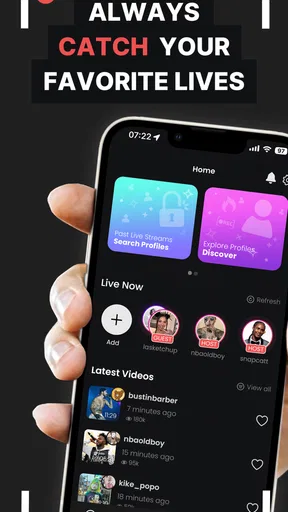
I often think about screen recording at the least convenient moment: a live stream is starting, I want to keep a useful demonstration, or someone is showing me something I may need to revisit. That is the situation Live Video Recorder - GREC is built around. Its focus is less on making a recording session feel like a production project and more on helping you catch a live video without having to remember to press record at exactly the right time. That narrow purpose is useful, but it also means the app makes the most sense when a live broadcast—not general-purpose editing—is the thing you want to keep.
When the network is part of the recording
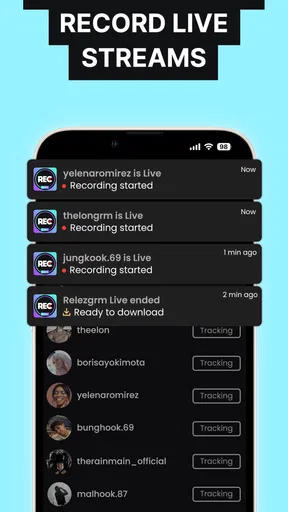
With live video, a recorder depends on a chain of events: the stream has to begin, the connection has to stay usable, and the recording has to capture what is actually playing on your screen. GREC’s automatic-start idea is appealing because it can reduce the chance of missing the opening while you are doing something else. I would still treat that convenience as a head start, not as a guarantee that every network interruption or change in a broadcast will be handled perfectly.
That distinction matters if the video is important. Before relying on an automatic capture, I would check that the live source is available, that the phone has a stable connection, and that there is enough free storage for a recording. A quick test with a less important stream is a sensible way to learn how the app behaves on your device. It also helps you spot whether your usual network has weak areas, such as a room where video playback regularly pauses.
Network conditions can affect the stream and the recording in different ways. If the video itself freezes, a recorder cannot restore the missing live content; it can only capture what reaches the screen. If the stream continues but the connection slows, picture quality may change before recording even enters the equation. I find it useful to separate those problems rather than immediately blaming the recorder: check whether playback is already stuttering, then decide whether the recording is the part that needs attention.
Using it in everyday mobile situations
GREC is a social app from GREC: Screen Recorder, and its appeal is clearest for people who follow live content on a phone. Imagine that a creator you follow tends to go live while you are commuting or making dinner. Automatic recording can be useful when you cannot watch the moment the broadcast begins, while a saved video gives you something to review later. For this kind of routine, the main benefit is not elaborate production; it is avoiding the need to keep checking the screen for the start of a stream.
There is a practical trade-off when using any recorder in a mobile setting. A phone may be moving between Wi-Fi and mobile data, entering a weak-signal area, or switching between apps. Those changes can interrupt playback or complicate a recording session. If a particular live video matters to you, I would choose a place with dependable reception, leave the phone undisturbed, and avoid treating a walk through patchy coverage as a reliable capture session.
Storage deserves the same planning as connectivity. A long video can take up space that you may need for photos, downloads, or other recordings. Before starting, I would review what is already saved and decide whether the clip is worth keeping in full. If you only need a short moment, trimming after capture can make the saved result easier to manage—but keeping several long recordings “just in case” can quickly turn a convenient feature into a storage chore.
What to do when a capture does not go to plan
Automatic recording reduces one kind of user error, but it does not remove every point of failure. The stream might start while the phone is busy, a connection may drop, or the recording may not turn out as expected. For a video you cannot afford to miss, I would not make the first attempt a high-stakes one. Test the same kind of live source beforehand, then check the resulting file rather than assuming that seeing a recording process begin means the finished video is complete and usable.
If playback stops, first look at the live source and connection. If playback is fine but the capture is not, close distractions and try a short test recording to isolate the issue. If the app or phone becomes unresponsive, restarting and testing again is more useful than repeatedly tapping controls during an important broadcast. These are ordinary troubleshooting steps, but they help distinguish a network problem from a device or app problem.
Recovery also means deciding what to do with a partial recording. A short, incomplete file can still be worth keeping if it contains the key moment, but it may not replace watching the full broadcast later. I would check the beginning and end before sharing it, especially if the clip is meant to explain something. A recording that silently misses the context can be confusing to someone who was not there live.
Being thoughtful about data and sharing
Recording a live video can involve more than storage: watching the stream may use mobile data, and sharing a large saved file can require another connection. If you are away from Wi-Fi, it is worth deciding whether the video is important enough to justify that use. I would avoid starting a long capture on a limited mobile plan without first considering the stream itself, rather than assuming that recording is a separate, data-free activity.
There is also a privacy question whenever a screen recording contains people, conversations, or information intended for a particular audience. Before keeping or sharing a clip, I would consider who appears in it and whether the content is appropriate to circulate. A recording made for personal reference is different from one posted publicly. That extra pause is especially worthwhile for live conversations, where people may not expect their words or images to be redistributed.
For sharing, a simple workflow is often best: review the clip, keep only the section you need, and then choose whether it belongs on your device or should be sent to someone. If the recording is just a reminder, there may be no reason to upload it anywhere. If it is meant for a wider audience, check the final clip for interruptions or private notifications before passing it along. Small checks like these make the difference between capturing a moment and sharing a polished, appropriate one.
Who will get the most from it
I would recommend GREC most to someone who regularly follows live videos and sometimes cannot be present when they begin. It may also suit a person who wants to revisit a public demonstration or keep a reference clip for personal use. The key is that the live-video workflow should be a real part of your routine. If you only record your screen occasionally, the built-in tools already available on many phones may be simpler, because they avoid adding another app to learn and maintain.
It is less suited to someone who needs a dependable professional archive, detailed control over capture, or a polished finished video straight away. A dedicated editing app is a better fit when the goal is assembling footage, adding a structured narrative, or preparing a clip for publication. Likewise, if your primary need is recording a meeting or a call, check that the relevant service and device allow the capture you want; a screen recorder does not override restrictions or make every conversation suitable to record.
Compared with the usual screen recorder, which typically asks you to start and stop a capture manually, GREC’s distinctive appeal is the automatic connection to live-video timing. That can be a meaningful convenience if you routinely miss the opening. The usual recorder remains the more flexible choice for a one-off tutorial, a settings walkthrough, or a quick bug demonstration where you know exactly when to begin. I would choose based on the task rather than expecting one app to be best for every kind of screen capture.
Getting Started with Ease
Right off the bat, downloading and setting up Live Video Recorder - GREC is a breeze. Available on both Android and iOS, it’s just a matter of visiting your app store, hitting that download button, and you’re good to go. No lengthy sign-up forms or unnecessary permissions. Just pure simplicity.
Once you open it, you’re greeted with a clean and intuitive interface. Trust me, you won’t need a manual to figure this one out. Everything is laid out logically, making it easy even for the most tech-averse folks.
Recording Features That Shine
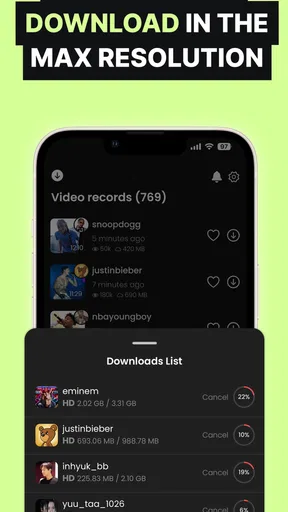
The app’s recording features are where the magic really happens. Want to capture a game walkthrough, a video call, or perhaps a tutorial? Just tap the record button, and you’re off. What I love most is the flexibility it offers. You can record in different resolutions, perfect if you’re conscious about storage space or need that crisp HD quality.
Another standout feature is the ability to record audio alongside the video. Whether it's the internal audio or through the microphone, it’s got you covered. This is particularly handy for gamers or educators who want to add commentary to their recordings.
Editing on the Go
Once you’ve got your recording, GREC doesn’t leave you hanging. It comes packed with basic editing tools that allow you to trim, cut, and even add some filters. It’s not going to replace a full-fledged editing suite, but for quick edits, it’s more than capable.
I found the editing process to be seamless. Just a few taps and you can polish your video to share instantly. It’s these little conveniences that really elevate the user experience.
Sharing Made Simple
We live in a world where sharing is everything. GREC understands this and offers direct sharing options to all major social media platforms. Whether you’re uploading to YouTube, Instagram, or just sending a video to a friend, it’s as simple as selecting your platform and hitting share. No need to save and upload manually.
What’s more, you can also save your creations directly to your device or cloud storage. This flexibility ensures your videos are accessible whenever and wherever you need them.
Why It Stands Out
In a market flooded with screen recording apps, what makes GREC stand out? It’s the perfect combination of ease-of-use, powerful features, and a clean interface that doesn’t overwhelm. Plus, it doesn’t hurt that it’s light on resources, ensuring your device’s performance isn’t bogged down.
And let's not forget about the app’s stability. I didn’t experience any crashes during my testing, which is a huge plus. Reliability is key when you’re in the middle of recording something important.
Final Thoughts
If you’re on the hunt for a screen recording app that’s both powerful and easy to use, GREC is a solid choice. It’s a tool that does exactly what it promises without any fuss or frills. Whether you're a gamer, a content creator, or just someone who wants to record a video call with loved ones, this app has got your back.
So, go ahead and give it a try. With its convenient features and user-friendly design, you might just find it becomes an indispensable part of your digital toolkit. Happy recording!
For anyone deciding whether it is worth installing, the practical details are straightforward: it is a free social app, rated for Everyone, with a 3.9 average from around 2.7 thousand ratings and more than 100 thousand installs. It was released on July 14, 2020, and version 4.7.1 requires Android 7.0 or later. Optional in-app purchases range from $1.99 to $59.99 per item, so I would check the purchase screen carefully before confirming anything; free to install does not necessarily mean every paid option is included.
A small test can save a frustrating evening
One useful habit is to make a brief trial capture before depending on the app for a long broadcast. Use a stream that is not important, then inspect whether the recording includes the picture and sound you expected and whether the file is easy to find afterward. This simple rehearsal answers several practical questions at once: how the app fits into your routine, whether the connection is steady where you plan to watch, and how much space a longer session might require on your phone.
I would also decide in advance what “success” means for a recording. If you only want a specific demonstration, you may not need to preserve an entire live session. If the opening is the important part, make sure your setup is ready before the expected start rather than relying on last-second attention. Thinking through the purpose first helps avoid collecting a large file that is difficult to search or share later.
How I would choose between GREC and another option
The most helpful question is whether automatic capture of live content solves a problem you actually have. If you miss broadcasts because they start while you are occupied, that focus gives GREC a reason to earn a place on your phone. If you mainly need to record a lesson you are presenting, an app with a manual start-and-stop workflow may be more predictable. If your priority is editing, a separate editor will usually make more sense than choosing a recorder for tools that are only meant for quick cleanup.
There is no need to use every capability simply because it is available. For a clip you intend to keep, I would capture only what is useful, trim the excess, and store or share it deliberately. For a temporary reminder, a quick review may be enough before deleting the file. That approach keeps the app useful without letting saved recordings accumulate into a second chore.
My connectivity verdict
GREC is most convincing when it helps you catch a live video you would otherwise miss, and least convincing when you expect it to solve problems caused by an unstable stream or a weak connection. I see it as a convenient helper for a specific mobile habit, not as a substitute for a reliable network, a general-purpose production studio, or a backup plan for an irreplaceable event. Prepare the connection, test the workflow, and check the result; with those modest precautions, its live-focused approach can be genuinely handy.
Verdict
Strengths of Live Video Recorder - GREC
- High-quality video recording output.
- User-friendly interface for easy navigation.
- Multiple recording modes available.
- Supports various video formats.
- Allows background recording.
Limitations of Live Video Recorder - GREC
- Contains in-app advertisements.
- Limited free features; requires purchase.
- Occasional lag during long recordings.
- No direct cloud storage integration.
- Consumes significant battery power.
Other Releases by GREC: Screen Recorder
View All
Record & Rewatch TT Live TKREC
Social4.5
Similar Picks in This Category
View All
Meta Platforms, Inc.4.6

Instagram4.0

Likee-Live, Chat & Party Games
Likeme Pte. Ltd.4.4

Facebook Lite
Meta Platforms, Inc.4.5

TikTok - Videos, Shop & LIVE
TikTok Pte. Ltd.4.0

Moj: Free Short Drama & Reels
ShareChat4.1
Frequently Asked Questions
What platforms does Live Video Recorder - GREC support?
Live Video Recorder - GREC is available for both Android and iOS devices. Users can download it from the Google Play Store for Android and the Apple App Store for iOS. The app is optimized to work smoothly on a wide range of devices, ensuring a seamless recording experience.
Can I record videos in high definition using Live Video Recorder - GREC?
Yes, Live Video Recorder - GREC supports high-definition video recording. Users can select various recording quality settings, including HD, to ensure they capture clear and detailed footage. The app allows you to adjust these settings based on your device's capabilities and storage availability.
Does Live Video Recorder - GREC offer cloud storage for recordings?
Currently, Live Video Recorder - GREC does not provide integrated cloud storage for video files. However, users can easily upload their recordings to third-party cloud services like Google Drive or Dropbox for safekeeping. This feature allows for easy access and sharing of videos across multiple devices.
Are there editing tools included in Live Video Recorder - GREC?
Live Video Recorder - GREC includes basic video editing tools that allow users to trim, cut, and merge videos directly within the app. While it offers essential features for quick edits, users seeking advanced editing options may need to use dedicated video editing software for more complex tasks.
Is there a limit to the recording duration in Live Video Recorder - GREC?
The recording duration in Live Video Recorder - GREC largely depends on the available storage on your device. There is no inherent time limit set by the app itself, but users should ensure they have sufficient space and battery life to accommodate longer recordings. Regularly managing your storage can help maintain optimal recording conditions.
